Showing posts with label extensions. Show all posts

Thursday, May 10, 2018

Checkmark

The folks at Ed Tech Team have a winner with the CheckMark Extension. 


I hope this extension will make your workflow easier and your feedback on student writing more robust. Remember that Chrome extensions are little programs that add functionality to your chrome browser.

We get tired. We also get frustrated of seeing the same mistake for the 20th time. Perhaps we also just get annoyed by writing the same corrections over and over.  Studies show that papers graded first earn higher marks than papers from the bottom of the pile. Perhaps this is why.
To get Checkmark, click this link.
You’ll now see in your menu bar a little checkbox icon.
I have already opened a google doc. (If you already had a google doc open, refresh it.) Now go up to the checkmark icon and enable it.
You’ll notice that there are common errors already listed and note you can add your own.
Once enabled, it couldn’t be easier to use . I warn you that the very first time you use it there may be a lag time which won’t continue to be a problem.
Just highlight a section you wish to correct and click the abbreviation above, you’ll see your correction appear as a comment. Here's a clip of me using on a google doc version of this post.


Friday, February 23, 2018

I usually have about 10 tabs open.


Back in the days when RSS was popular, I used it to control my internet reading. Twitter has replaced it. But here's my problem, when reading Twitter I often find myself opening several multiple tabs and then leave them open to read later. I bookmark. And then I rarely read my bookmarks. I used to archive with diigo and expect that I still have that account. I haven't checked it in years.

So, I resigned myself to pinning tabs, saving the most important websites to the task bar and leaving lots of tabs open. In my downtime, I go through my open tabs, reading these sites that had interested me. Messy I know. Far from best practice. It's just how I roll.

So I am glad to see the Reading List Chrome extension. With it, I can easily create a reading list to check out later by simply clicking the extension icon and then the green + button.  Now excuse me while I close my open tabs.


Tuesday, May 2, 2017

My new favorite extension?

Image result for blackmenu

I do almost all of my work through the Chrome Browser. I just added a new extension to my browser that looks promising. It provides a menu for my favorite google apps. It seems it will be a time saver.
I'll post in a week letting you know if I actually use it and how much I like it. I've played with it a bit today and I like it a lot. Let's see how much I still use it once the novelty wears off.

My first impressions are very complimentary.

Tuesday, January 10, 2017

Alice Keeler and Matt Miller, Gurus.


I'm amazed by the ever improving functionality of the chrome browser and google apps because of the flood of add-ons and extensions. I've written about them a lot. Their only downside is the sheer volume of them. It is hard to stay current and to always know what are the best of these. Also, my bar next to my omnibox is getting very very crowded with chrome extensions. Yes, I quibble, but this does get to my point that this is all a little bit unwieldy. Still, the positives overwhelm my quibbles.

To stay current, no one is more useful than Matt Miller's Ditch that Textbook blog and Alice Keeler's blog. Alice is more of a "how to" guru for all things Google while Matt challenges the status quo in education. That's not quite fair to either of them for Matt shares plenty of "how to's" and implicit in every Alice Keeler post is the idea that there is a better way to do things.

Seriously, follow these two bloggers. Recently, like the Wonder Twins, they combined forces to create a very useful chrome extension of which I post the video below. Alice and Matt help me stay on top of this flood of information. I once heard that staying current with tech is like drinking from a fire hydrant.  These two help me stay current and more importantly help me see how tools such as these can transform education.


Wednesday, November 30, 2016

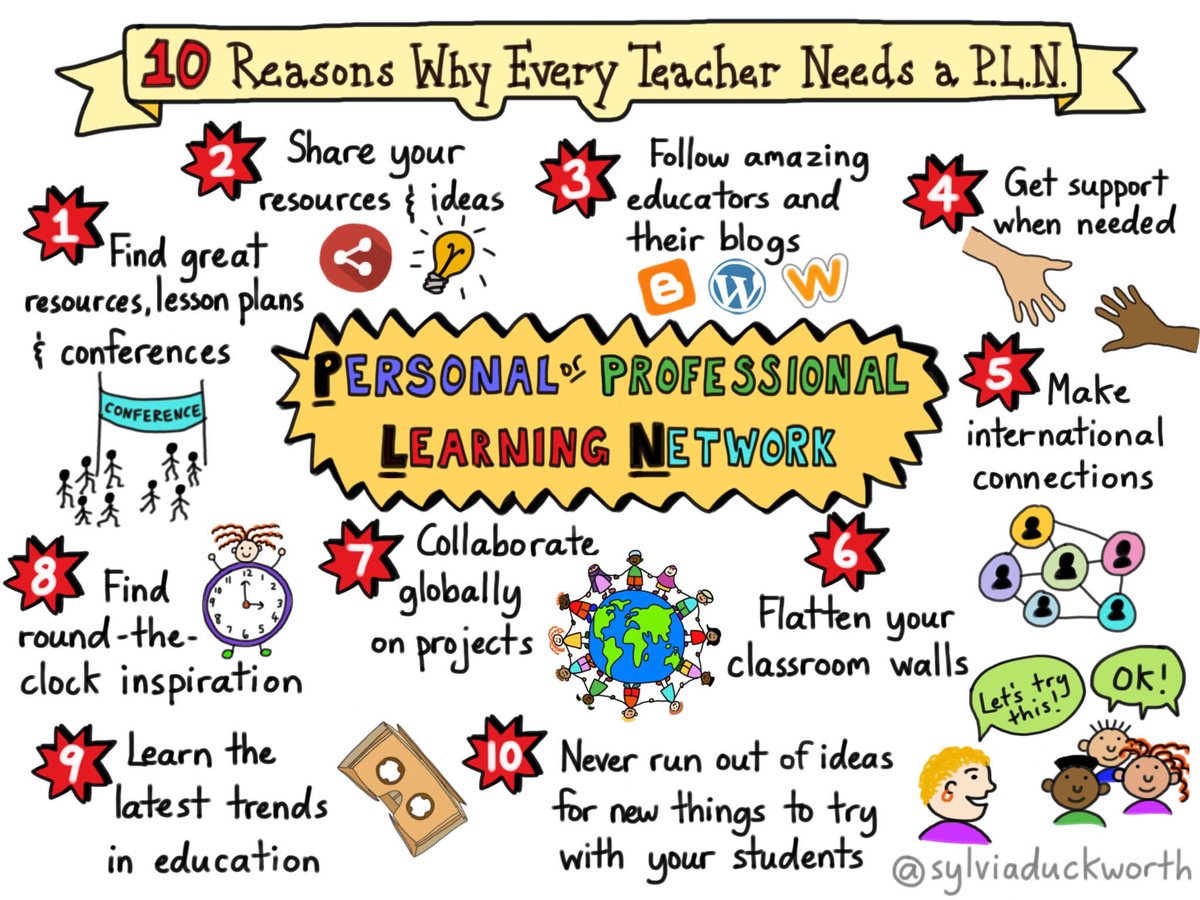
On PLNs and small victories

I like small victories. Today I had one because of my PLN (Professional Learning Network). One of my regular reads is Matt Bergman's Learn Lead Grow blog. I follow him through Google+. His post today was about a cool chrome extension to help those with dyslexia better read their chrome browser.

After reading his blog, I went right to the support services team at school and shared this chrome tool and then showed them how to access it themselves via chrome extensions. A cool side benefit is that I also showed these folks the cool world of Chrome add-ons and extensions. Because of Matt's blog and my PLN, the learning and reading specialist, the head of support services, and the ESL teacher all now can share with their students this effective tool. I was pleased to hear the reading specialist explain to me why she thinks the extension is a useful tool for those who have dyslexia.

Yesterday, AJ Juliani shared his reading list. Though my list is not as vast as his, here are some of the people and sites that I read almost daily.

  1. AJ Juliani - A great big-picture and inspirational tech though leader. For AJ, it is always about the bigger questions. It isn't really about the tech, it is about what tech allows us to do. 
  2. Learn, Lead, Grow - Matt Bergman is a thoughtful tech innovator. 
  3. Jordan Shapiro at Forbes magazine always offers provocative articles about education and education policy. 
  4. +Alice Keeler- a true Google guru. What doesn't she know how to do? I can't keep up with her output. But she is amazing. 
  5. Finally, I check out this Education Technology and Mobile Learning blog for its broad array of tips and tools.  
This list is not exhaustive. I also contribute to and read Google+ posts. +Kyle Beatty and +Dan Crowley are terrific aggregators of fascinating tech and ed-tech information. Their commentaries on are always interesting and well considered. I tweet and receive a steady stream of education and ed-tech tweets as well. These are crucial components of my PLN.
https://pbs.twimg.com/media/CkswcFeW0AAGg1Y.jpg
Important people who used to be part of my PLN

I don't read him too much anymore, but Will Richardson helped me connect technology to my already very progressive pedagogy. Before Will, I thought tech useful, but didn't really see its potential transformative power. His blog that I used to read no longer exists. Currently, I follow him on Medium and am happy when his work pops up on that aptly named medium. 

Lea Hansen was likely my first daily read. I don't check her out much anymore, but her classroom blog was a tremendous inspiration to me back when I was a social studies teacher five and six years ago. 

I also found Jennifer Ward's work to be amazing. She barely posts anymore, but thanks Jennifer. You taught me a lot. 

I also read quite a few history teaching sites that I don't list here. Though they are tech related, they are less germane to this general ed-tech blog. Unlike the folks I list above, I don't read them daily. They are bookmarked sites I visit frequently, but they aren't part of my PLN.

To my about 50 or so daily readers (and thanks so much to all of you!) I am sure that I am preaching to the choir in saying get a PLN. If you somehow have come across me, surely some of the names I mention above are already very familiar to you. If not, I hope you find them as interesting as I do. 

I love my PLN. I almost wish the unwieldy immersion into learning it offers could be accredited because I've learned more from it than I did through my Master's degree. I learned something today that wasn't earth-shattering. But I made three teachers very excited today and their new knowledge will directly benefit students right away. Without my PLN, this small victory would not have happened.

Please retweet this along with your favorite reads.


Saturday, October 15, 2016

Google Classroom and Chrome Extensions

In the summer, I wrote about some of my favorite Chrome Extensions. I have three more to share. Chrome Extensions increase the functionality and ease of use in the Chrome Browser. Some extensions allow for shortcuts that are so quick and cool. Others add levels of functionality that will surprise you. Fellow teachers and tech users, these extensions are for your full Chrome browser.

My new favorites include:
1) Share to Classroom. If you use Google Classroom, get this one. With just a click you can send any link right into Google Classroom. +#FCS Upper School Faculty

2) Google Tone. +Dan Crowley showed me this yesterday. You no longer have to email a url you like in order to share it quickly. Google Tone uses your computer's speakers to exchange URLs with nearby computers. You can send the URL to any webpage, YouTube video, even search results.

3) Google Docs Quick Create. Quickly create new google docs, spreadsheets, forms and presentations right out of your browser. It'll save you more than a few clicks.

Friday, July 29, 2016

Chrome Extensions and Add-Ons I Like or Why Chromebooks Rock


Back when the Chromebook was just coming out, many people thought the google apps for school were just not robust enough in comparison to the Apple operating system and Windows. I remember teachers and parents complaining that Microsoft's Office Suite was far superior to its Google counterparts. In the face of some of these complaints and concerns,  my school eventually chose the iPad over the Chromebook.  At the time, a solid case could be made. However, in the four years since that decision , many of the arguments against Chromebooks no longer can be made. I am not alone in feeling this way. 

Google has made vast improvements. One of the ways they have made these improvements is an ever increasing array of extensions and add-ons. This mass array of free software (not so on iPad) in my mind gives Chromebooks the edge in addition to the reasons cited above in the article. I use these free apps and extensions all the time.


Here are some of the extensions I use the most:

  •  EdPuzzle. EdPuzzle lets me quickly edit YouTube videos for class. I can even embed questions for students to answer.
  • Snagit. A simple screenshot capture tool. I use this so often.
  •  Draftback. This one is a game changer. This basically takes a movie of a paper being in written. Imagine meeting with a students and replaying at a slightly faster speed them writing their papers? There are powerful learning and teaching moments in doing that. Its very viewing promotes metacognition in the student.
  •  Flip It. Works in conjunction with Flipboard. I can easy and quickly add articles I like into any Flipboard magazine.
  •  The QR Code Extension. It instantly lets me make a QR code of any webpage I'm on.

Google "best chrome extensions" and you'll be amazed at the seemingly endless amount of functionality you can add to your Chrome experience.

     Add-ons, on the other hand, add functionality within a particular google app such as sheets or docs. Below is a screenshot of my add-ons in google docs. Admittedly, it is blurry, but you can see how to access add-ons. It is right there in the menu bar.
  Within docs,  I really like Mindmeister. It is a great mapping tool for writing.  My list also includes EasyBib, Easy Accents (great when trying to type in a different language) and ProWriting Aid. 
   Within sheets, Doctopus is a great tool for editing student work. I've also used the SiteMaestro add-on to share google site a common but individualized google site with students. 

   I've shifted from being slightly in favor of iPads as the best tool for students to overwhelmingly feeling that Chromebooks are the best tool. Add-ons and Extensions are a significant reason why I feel that way.  

Featured Post

Prezi Video

 Remember Prezi? Once upon a time it was all rage for students. I see very few students use this tool any longer. Prezi is back, though, wit...